

Description
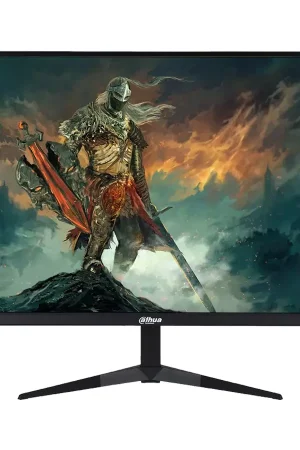
HUAWEI MateView SE 23.8 Inch Vertical Rotatable Monitor
Overview for HUAWEI MateView SE:
The HUAWEI MateView SE is designed to enhance your computing experience. With its vertical rotatability, Full HD resolution, and thoughtful features, it’s more than just a monitor—it’s a companion that adapts to your needs.

Key Features for HUAWEI MateView SE:
- Vertical Rotatability:
- The MateView SE can be rotated vertically, allowing you to switch seamlessly between portrait and landscape modes. Perfect for coding, reading lengthy documents, or browsing social media feeds.
- Full HD Resolution (1920 x 1080 pixels):
- Enjoy crisp visuals, sharp text, and vibrant colors. Whether you’re editing photos, watching movies, or working on spreadsheets, the Full HD resolution ensures clarity.
- 75Hz Refresh Rate:
- Smooth animations and fluid transitions make multitasking and gaming more enjoyable. The 75Hz refresh rate minimizes motion blur, providing a responsive experience.
- 178° Viewing Angles:
- IPS technology ensures consistent colors and clarity, even when viewing the monitor from extreme angles. Collaborate with colleagues or share content with friends without compromising quality.
- Slim Bezel Design:
- The ultra-thin bezels create an immersive viewing area. Whether you’re using a single monitor or setting up a multi-monitor configuration, the slim bezels enhance aesthetics.
- Eye Comfort Features:
- TÜV Rheinland Certified: Low blue light emission reduces eye strain during extended usage.
- Flicker-Free Technology: Say goodbye to screen flicker, which can cause discomfort and fatigue.
- Connectivity Options:
- USB-C Port: Connect your laptop or smartphone with a single cable for video, data, and power.
- HDMI and VGA Ports: Versatile connectivity for various devices.
- Built-in Speakers: Enjoy audio without additional accessories.
Specifications for HUAWEI MateView SE:
- Panel Type: IPS (In-Plane Switching)
- Brightness: 250 nits
- Response Time: 5ms
- Color Gamut: 72% NTSC
- Dimensions (with Stand): 539.2mm (W) x 180mm (D) x 422.5mm (H)
- Weight (with Stand): 4.9 kg
Ideal Use Cases for HUAWEI MateView SE:
- Productivity and Creativity:
- Edit photos, videos, and graphics with precision.
- Code comfortably in portrait mode.
- Multitask efficiently with split-screen views.
- Entertainment and Gaming:
- Enjoy movies, streaming, and casual gaming.
- Rotate the monitor for an immersive gaming experience.
- Office and Home Setup:
- Sleek design complements any workspace.
- Wall-mountable for space-saving solutions.
Let’s explore the world of rotating monitors and why they’re more than just screens—they’re ergonomic companions that enhance productivity and comfort.
- Vertical Monitor Orientation: A Productivity Boost in HUAWEI MateView SE
- What Is It? A rotating monitor, also known as a vertical monitor, allows you to switch between landscape and portrait modes. By turning the screen 90 degrees, you gain a taller display that’s perfect for reading lengthy documents, coding, or browsing social media feeds.
- Benefits:
- Multi-Monitor Setups: Pair a vertical monitor with your main display for efficient multitasking. Compare spreadsheets, read articles, or keep an eye on your chat window—all without cluttering your workspace.
- Ergonomic Comfort: Vertical orientation reduces neck strain, especially when working with long documents. Your eyes move naturally from top to bottom, minimizing lateral head movements.
- Coding and Programming: Programmers love vertical monitors. The extra height accommodates longer lines of code, making debugging and development smoother.
- Portrait Photography and Design: Artists and photographers appreciate the extended canvas for editing vertical images or designing layouts.
- Choosing the Right Vertical Monitor:
- Look for monitors with stands that allow easy rotation into portrait mode. Consider factors like resolution, brightness, and connectivity options. Whether you’re a creative professional, a data analyst, or a casual user, a vertical monitor can revolutionize your workflow.
Let’s delve into the fascinating world of IPS (In-Plane Switching) displays. These panels have revolutionized visual experiences across various devices, from monitors to smartphones. Here are the key aspects of IPS displays:
- Better Color Reproduction and Accuracy:
- IPS panels excel in color reproduction. Unlike their TN (Twisted Nematic) counterparts, which offer limited color depth, IPS displays provide a broader range of colors. This translates to more accurate and vibrant hues, making them ideal for content creation, photo editing, and video production.
- Whether you’re a designer seeking precise color representation or a casual user enjoying multimedia content, IPS monitors deliver consistent and lifelike visuals. The 8-bit and even 16-bit to 24-bit RGB color depths ensure rich gradients and true-to-life shades.
- Wide Viewing Angles:
- IPS technology offers wide viewing angles—up to 178 degrees horizontally and vertically. Unlike TN panels that suffer from color shifts when viewed off-axis, IPS panels maintain image quality even from extreme angles.
- Whether you’re collaborating with colleagues, sharing your screen during presentations, or simply adjusting your monitor for comfort, IPS ensures consistent visuals for everyone in the room.



Reviews
There are no reviews yet.